Amazon Seller Stock Checker: How to Check Seller Stock Levels Faster
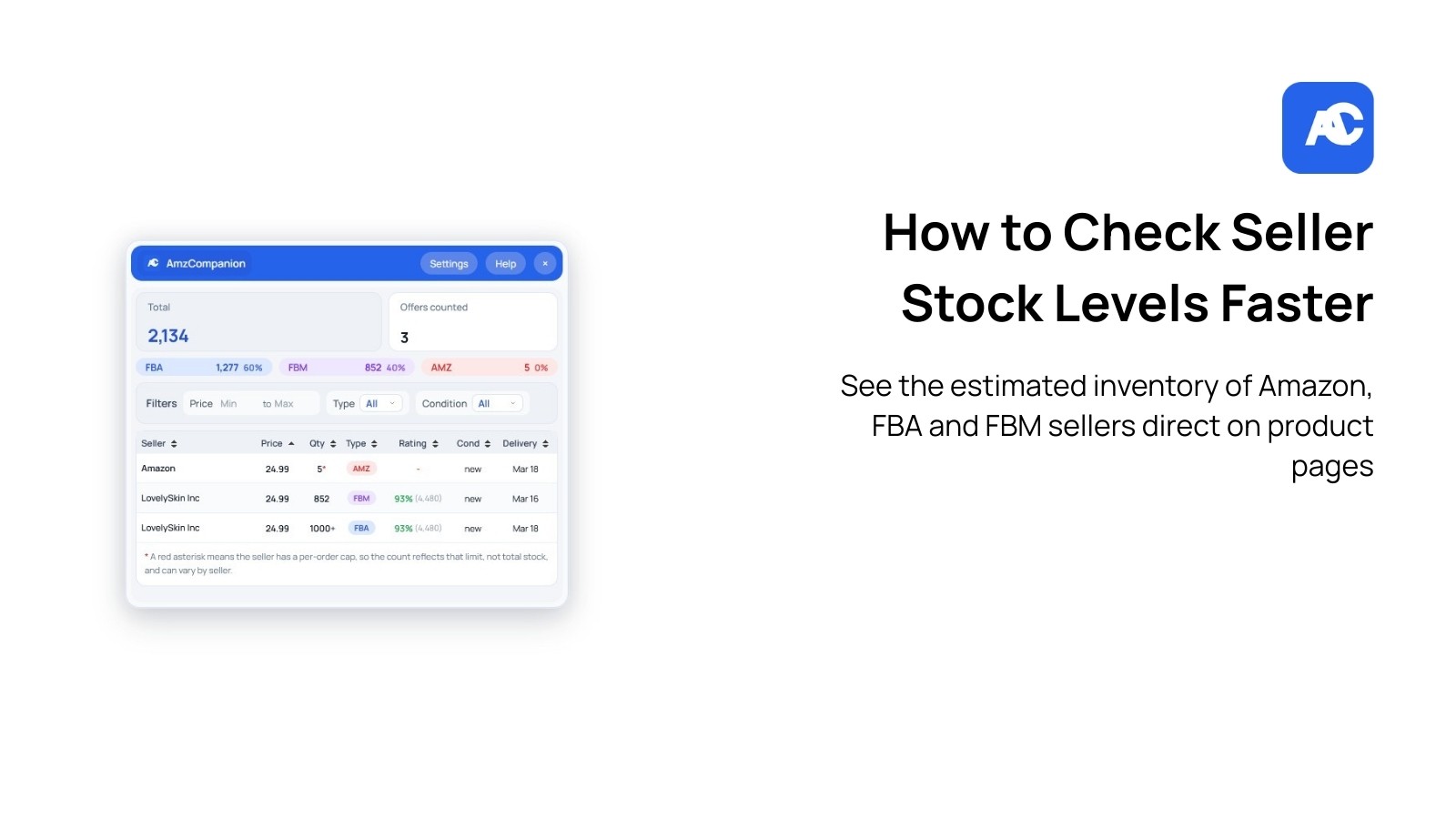
Amazon Seller Stock Checker: How to Check Seller Stock Levels Faster
If you sell on Amazon, stock visibility can be incredibly useful. Whether you are monitoring competitor activity, researching a product, or trying to understand how quickly offers are moving, knowing how to check seller stock levels can help you make better decisions.
The problem is that Amazon does not always make this process simple. Many sellers still rely on manual checking, repeated page refreshes, and slow workflows to estimate stock levels or review offer activity.
That is where an Amazon seller stock checker can help. Tools like AmzCompanion make it easier to review seller and offer activity in a faster browser-based workflow, so you can spend less time on manual checks and more time analysing listings.
What is an Amazon seller stock checker?
An Amazon seller stock checker is a tool or workflow used to help estimate or analyse stock-related information on Amazon listings.
Depending on the method, sellers may use it to:
• Review seller offer activity
• Estimate available stock
• Monitor changes over time
• Compare sellers on the same listing
• Support product research and competitor analysis
For Amazon sellers, this kind of visibility can be useful when evaluating demand, supply pressure, stock movement, and seller competition.
Why sellers care about stock levels
Seller stock data can be helpful for more than simple curiosity. In many cases, it supports real commercial decisions.
Competitor monitoring
If a competing seller appears to be running low on stock, that may affect pricing pressure, Buy Box dynamics, or short-term opportunity.
Product research
Stock movement can sometimes help you understand how active a listing is and whether sellers appear to be replenishing inventory consistently.
Offer analysis
When multiple sellers are on one listing, stock visibility can add extra context to the offer stack and help you understand the competitive environment.
Timing decisions
Some sellers use stock-related signals to guide decisions around repricing, restocking, expansion, or testing new products.
The problem with checking stock manually
Manual stock checking is possible, but it is rarely efficient.
A typical manual workflow often looks like this:
Open a product listing
Inspect the seller offers
Test quantity changes
Refresh or repeat the process
Record findings somewhere else
Repeat for the next ASIN
This becomes slow very quickly.
The main issues with manual checking are:
• It takes too much time
• It is repetitive
• It is hard to scale across many listings
• It interrupts product research workflow
• It increases the chance of inconsistent checks
For a seller doing regular Amazon analysis, this creates a lot of friction.
How an Amazon seller stock checker helps
A good Amazon seller stock checker should reduce manual effort and make the workflow easier.
Instead of forcing you into a separate dashboard or requiring constant copy-paste work, the best setup is one that supports analysis closer to the Amazon product page itself.
That is the main advantage of using a browser-based workflow.
With the right setup, you can:
• Review stock-related context faster
• Analyse seller offers more efficiently
• Reduce repetitive manual checks
• Stay inside your normal Amazon browsing workflow
• Move from research to action faster
What to look for in a seller stock checker
Not every tool or workflow is equally useful. If you are evaluating options, these are the main things to look for.
Speed
If the workflow is slow, it defeats the purpose. The biggest benefit of a seller stock checker is saving time during research.
Ease of use
It should fit naturally into how you already review Amazon listings. The fewer extra steps, the better.
Offer visibility
Stock-related analysis is more useful when paired with seller and offer context, rather than treated as an isolated number.
Browser-based workflow
For many Amazon sellers, a browser extension is more practical than constantly switching to a separate platform.
Support for ongoing research
The tool should help with repeated day-to-day analysis, not just one-off checks.
How AmzCompanion fits this workflow
If you want to compare options or see whether it fits your workflow, you can view pricing before installing.
Rather than forcing you into a disconnected workflow, AmzCompanion is built as a browser extension experience so you can review listing-level context more efficiently.
This makes it useful for sellers who want to:
• Analyse seller stock faster
• Reduce manual checking
• Review offers more efficiently
• Stay inside the browser while researching products
• Streamline day-to-day Amazon analysis
Key ways AmzCompanion can help
Faster listing analysis
Instead of relying on a slow manual process, you can review seller and offer context more quickly while already on the Amazon page.
Better workflow efficiency
Amazon research often involves checking multiple products in a row. A browser-based setup helps reduce context switching.
Useful for stock and offer review
Stock-related insights are often most valuable when viewed alongside broader listing and seller activity.
Built for practical seller use
The focus is not on adding complexity. It is on making the analysis process easier, faster, and closer to the point where sellers are already working.
When should you use a seller stock checker?
An Amazon seller stock checker can be especially helpful when:
• Researching new products
• Reviewing competitor listings
• Monitoring recurring seller activity
• Comparing seller behaviour across offers
• Doing routine Amazon listing analysis
For active sellers, even a small reduction in manual effort can compound into a major time saving over a week or month.
Example use cases
Competitor stock checks
You notice a competitor on a listing and want to know whether they are likely to go out of stock soon or whether they appear well stocked.
Offer stack research
You are reviewing the seller offers on a listing and want more context around the competitive picture.
Product sourcing research
You are exploring a product opportunity and want more signals beyond just price and visible seller count.
Operational workflow improvement
You already do this type of checking manually and want a faster, cleaner workflow.
Browser extension vs manual workflow
There is a big practical difference between a browser extension workflow and a manual process.
Manual process
• Repetitive
• Slower
• Harder to scale
• More tab switching
• More copy-paste
Browser-based workflow
• Faster
• Closer to the product page
• Easier to repeat across many listings
• More practical for day-to-day use
• Better suited to active sellers
For many users, that workflow difference is the real benefit.
Who this is for
This kind of tool is especially relevant for:
• Amazon sellers
• FBA sellers
• Ecommerce operators
• Product researchers
• Virtual assistants
• Agencies supporting Amazon brands
If you regularly analyse listings, sellers, or offers, a seller stock checker can fit naturally into your workflow.
Best practices when using stock-related data
Stock-related analysis is useful, but it should be treated as one input rather than the only input.
It works best when combined with:
• Offer analysis
• Pricing context
• Seller count
• Listing history
• Product research judgement
In other words, use it to support decisions, not replace them.
Final thoughts
For many Amazon sellers, checking stock levels manually is too slow and too repetitive to scale well. An Amazon seller stock checker helps make that process faster and more practical.
If your current workflow involves repeated manual checks, constant refreshing, or too much time spent piecing together listing context, moving to a browser-based workflow can be a strong upgrade.
AmzCompanion is built to help Amazon sellers analyse seller and offer activity more efficiently while browsing Amazon, making it easier to stay in flow and make faster research decisions.
FAQ
What is an Amazon seller stock checker?
An Amazon seller stock checker is a tool or workflow that helps sellers analyse stock-related information and offer activity on Amazon listings.
Why do Amazon sellers check stock levels?
They may do it for competitor monitoring, product research, offer analysis, or to better understand listing activity.
Is manual stock checking enough?
It can work for occasional checks, but it becomes inefficient when repeated across many listings.
Why use a browser extension for seller stock checking?
A browser extension keeps the analysis closer to the Amazon page, which usually makes the workflow faster and easier.
Is AmzCompanion only for advanced sellers?
No. It can be useful for solo sellers, growing brands, virtual assistants, and teams that regularly analyse Amazon listings.
Get started with AmzCompanion
If you want a faster way to analyse seller stock and offer activity on Amazon, try AmzCompanion.
• Explore AmzCompanion
• View pricing
• Install on Chrome
• Install on Firefox
Related reading
• How Amazon Sellers Track Competitor Inventory
• Best Amazon Seller Stock Checker Tools
• FBA vs FBM Stock Analysis for Amazon Sellers
Amazon Seller Stock Checker: How to Check Seller Stock Levels Faster
If you sell on Amazon, stock visibility can be incredibly useful. Whether you are monitoring competitor activity, researching a product, or trying to understand how quickly offers are moving, knowing how to check seller stock levels can help you make better decisions.
The problem is that Amazon does not always make this process simple. Many sellers still rely on manual checking, repeated page refreshes, and slow workflows to estimate stock levels or review offer activity.
That is where an Amazon seller stock checker can help. Tools like AmzCompanion make it easier to review seller and offer activity in a faster browser-based workflow, so you can spend less time on manual checks and more time analysing listings.
What is an Amazon seller stock checker?
An Amazon seller stock checker is a tool or workflow used to help estimate or analyse stock-related information on Amazon listings.
Depending on the method, sellers may use it to:
• Review seller offer activity
• Estimate available stock
• Monitor changes over time
• Compare sellers on the same listing
• Support product research and competitor analysis
For Amazon sellers, this kind of visibility can be useful when evaluating demand, supply pressure, stock movement, and seller competition.
Why sellers care about stock levels
Seller stock data can be helpful for more than simple curiosity. In many cases, it supports real commercial decisions.
Competitor monitoring
If a competing seller appears to be running low on stock, that may affect pricing pressure, Buy Box dynamics, or short-term opportunity.
Product research
Stock movement can sometimes help you understand how active a listing is and whether sellers appear to be replenishing inventory consistently.
Offer analysis
When multiple sellers are on one listing, stock visibility can add extra context to the offer stack and help you understand the competitive environment.
Timing decisions
Some sellers use stock-related signals to guide decisions around repricing, restocking, expansion, or testing new products.
The problem with checking stock manually
Manual stock checking is possible, but it is rarely efficient.
A typical manual workflow often looks like this:
Open a product listing
Inspect the seller offers
Test quantity changes
Refresh or repeat the process
Record findings somewhere else
Repeat for the next ASIN
This becomes slow very quickly.
The main issues with manual checking are:
• It takes too much time
• It is repetitive
• It is hard to scale across many listings
• It interrupts product research workflow
• It increases the chance of inconsistent checks
For a seller doing regular Amazon analysis, this creates a lot of friction.
How an Amazon seller stock checker helps
A good Amazon seller stock checker should reduce manual effort and make the workflow easier.
Instead of forcing you into a separate dashboard or requiring constant copy-paste work, the best setup is one that supports analysis closer to the Amazon product page itself.
That is the main advantage of using a browser-based workflow.
With the right setup, you can:
• Review stock-related context faster
• Analyse seller offers more efficiently
• Reduce repetitive manual checks
• Stay inside your normal Amazon browsing workflow
• Move from research to action faster
What to look for in a seller stock checker
Not every tool or workflow is equally useful. If you are evaluating options, these are the main things to look for.
Speed
If the workflow is slow, it defeats the purpose. The biggest benefit of a seller stock checker is saving time during research.
Ease of use
It should fit naturally into how you already review Amazon listings. The fewer extra steps, the better.
Offer visibility
Stock-related analysis is more useful when paired with seller and offer context, rather than treated as an isolated number.
Browser-based workflow
For many Amazon sellers, a browser extension is more practical than constantly switching to a separate platform.
Support for ongoing research
The tool should help with repeated day-to-day analysis, not just one-off checks.
How AmzCompanion fits this workflow
If you want to compare options or see whether it fits your workflow, you can view pricing before installing.
Rather than forcing you into a disconnected workflow, AmzCompanion is built as a browser extension experience so you can review listing-level context more efficiently.
This makes it useful for sellers who want to:
• Analyse seller stock faster
• Reduce manual checking
• Review offers more efficiently
• Stay inside the browser while researching products
• Streamline day-to-day Amazon analysis
Key ways AmzCompanion can help
Faster listing analysis
Instead of relying on a slow manual process, you can review seller and offer context more quickly while already on the Amazon page.
Better workflow efficiency
Amazon research often involves checking multiple products in a row. A browser-based setup helps reduce context switching.
Useful for stock and offer review
Stock-related insights are often most valuable when viewed alongside broader listing and seller activity.
Built for practical seller use
The focus is not on adding complexity. It is on making the analysis process easier, faster, and closer to the point where sellers are already working.
When should you use a seller stock checker?
An Amazon seller stock checker can be especially helpful when:
• Researching new products
• Reviewing competitor listings
• Monitoring recurring seller activity
• Comparing seller behaviour across offers
• Doing routine Amazon listing analysis
For active sellers, even a small reduction in manual effort can compound into a major time saving over a week or month.
Example use cases
Competitor stock checks
You notice a competitor on a listing and want to know whether they are likely to go out of stock soon or whether they appear well stocked.
Offer stack research
You are reviewing the seller offers on a listing and want more context around the competitive picture.
Product sourcing research
You are exploring a product opportunity and want more signals beyond just price and visible seller count.
Operational workflow improvement
You already do this type of checking manually and want a faster, cleaner workflow.
Browser extension vs manual workflow
There is a big practical difference between a browser extension workflow and a manual process.
Manual process
• Repetitive
• Slower
• Harder to scale
• More tab switching
• More copy-paste
Browser-based workflow
• Faster
• Closer to the product page
• Easier to repeat across many listings
• More practical for day-to-day use
• Better suited to active sellers
For many users, that workflow difference is the real benefit.
Who this is for
This kind of tool is especially relevant for:
• Amazon sellers
• FBA sellers
• Ecommerce operators
• Product researchers
• Virtual assistants
• Agencies supporting Amazon brands
If you regularly analyse listings, sellers, or offers, a seller stock checker can fit naturally into your workflow.
Best practices when using stock-related data
Stock-related analysis is useful, but it should be treated as one input rather than the only input.
It works best when combined with:
• Offer analysis
• Pricing context
• Seller count
• Listing history
• Product research judgement
In other words, use it to support decisions, not replace them.
Final thoughts
For many Amazon sellers, checking stock levels manually is too slow and too repetitive to scale well. An Amazon seller stock checker helps make that process faster and more practical.
If your current workflow involves repeated manual checks, constant refreshing, or too much time spent piecing together listing context, moving to a browser-based workflow can be a strong upgrade.
AmzCompanion is built to help Amazon sellers analyse seller and offer activity more efficiently while browsing Amazon, making it easier to stay in flow and make faster research decisions.
FAQ
What is an Amazon seller stock checker?
An Amazon seller stock checker is a tool or workflow that helps sellers analyse stock-related information and offer activity on Amazon listings.
Why do Amazon sellers check stock levels?
They may do it for competitor monitoring, product research, offer analysis, or to better understand listing activity.
Is manual stock checking enough?
It can work for occasional checks, but it becomes inefficient when repeated across many listings.
Why use a browser extension for seller stock checking?
A browser extension keeps the analysis closer to the Amazon page, which usually makes the workflow faster and easier.
Is AmzCompanion only for advanced sellers?
No. It can be useful for solo sellers, growing brands, virtual assistants, and teams that regularly analyse Amazon listings.
Get started with AmzCompanion
If you want a faster way to analyse seller stock and offer activity on Amazon, try AmzCompanion.
• Explore AmzCompanion
• View pricing
• Install on Chrome
• Install on Firefox
Related reading
• How Amazon Sellers Track Competitor Inventory
• Best Amazon Seller Stock Checker Tools
• FBA vs FBM Stock Analysis for Amazon Sellers
See Seller Stock on Amazon Pages
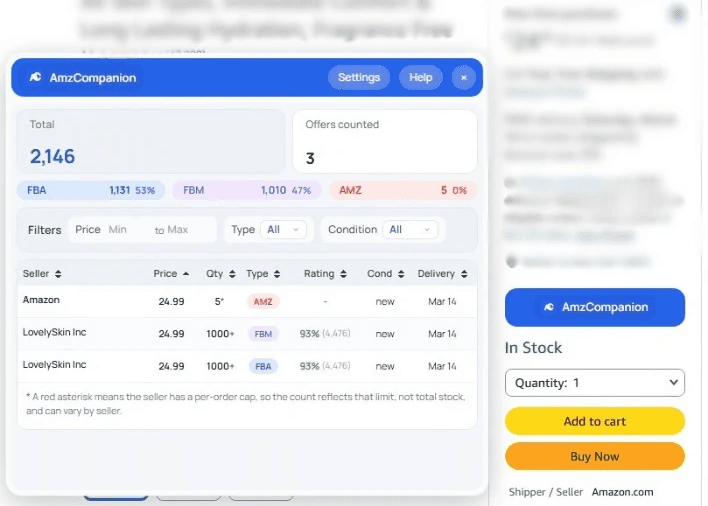
Use AmzCompanion to view estimated seller stock breakdowns, seller count, combined inventory, and offer filters while analysing listings.
14-day free trial • Cancel anytime • Prices in USD
See Seller Stock on Amazon Pages
Use AmzCompanion to view estimated seller stock breakdowns, seller count, combined inventory, and offer filters while analysing listings.
14-day free trial • Cancel anytime • Prices in USD